Googlebooks returns Android navigation buttons to keyboard layout
Google has added physical navigation icons to its Googlebooks operating system keyboards.
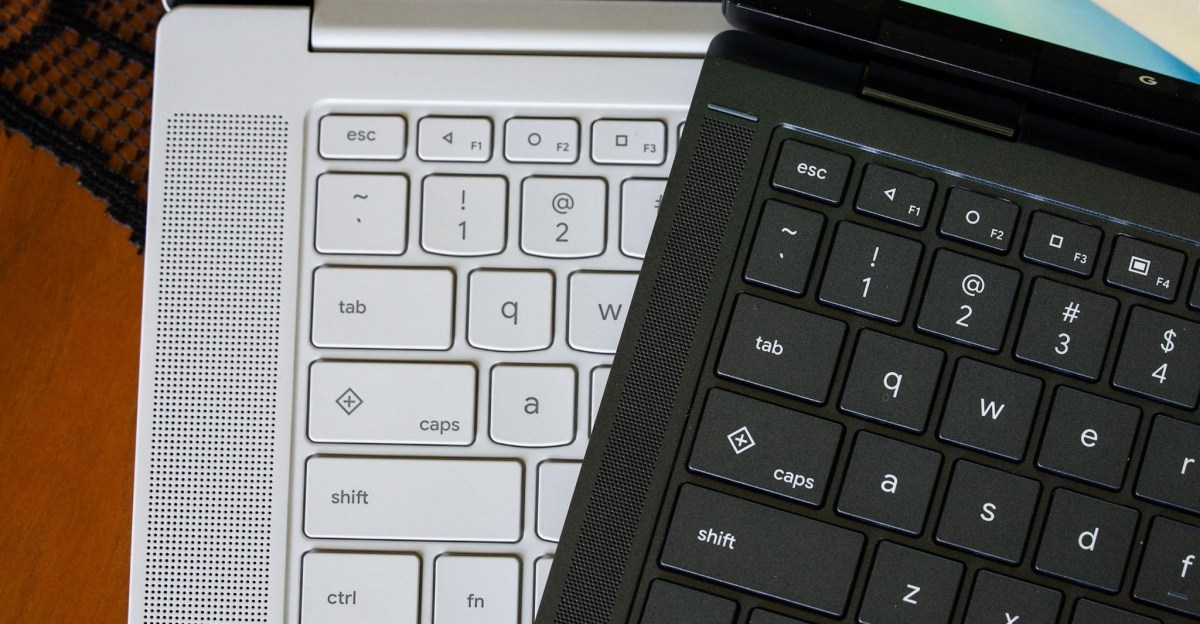
Keyboard function keys return old icons
The F1, F2, and F3 keys now display the triangle, circle, and square symbols used on Android phones since 2014. These specific buttons first appeared on Android 5.0 Lollipop before the industry shifted to gesture-based navigation controls.
Buttons perform expected desktop tasks
The left-pointing triangle executes a back command, while the circle minimizes all open applications to reach the home screen. The square icon tiles open apps in a grid similar to macOS Mission Control or Windows Task View.
Design matches other Google devices
This layout ensures that navigation controls are consistent across all Googlebooks machines for users who prefer physical buttons. The feature is particularly useful when running Android applications that lack optimization for mouse input on a desktop interface.
Reported by one outlet
Only one outlet has published this. Nothing here has been checked against a second report, so read it as that outlet's account and follow the link below for the original.
Reported by
1 independent outlet. Headline as published. Links open the original report.