Apple HomeView setup requires iPhone or iPad pairing
Users can now set up the new Apple HomeView smart display by holding an iPhone running iOS 27.2 or an iPad running iPadOS 27.2 near the device.
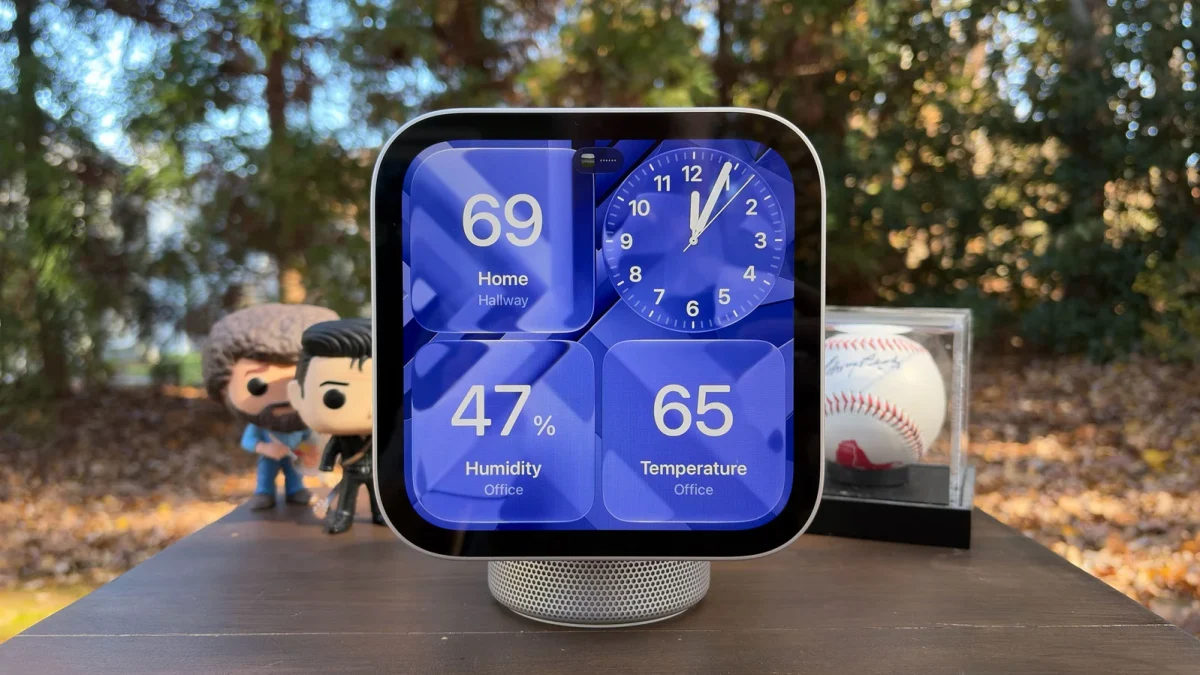
Device mirroring and privacy rules
The HomeView does not run its own apps but instead mirrors compatible applications from a paired phone or tablet. Core suite items like Calendar, Messages, Reminders and Weather appear on the screen for household members to view. The system will not host personal information unless it verifies identity through facial recognition while the paired device stays nearby. This design ensures that all family members can use the display without compromising individual privacy settings.
Siri AI and software requirements
To make full use of HomeView, users must be comfortable running Apple Intelligence features on their connected devices. The system constantly listens to Siri queries and relies on the next-generation assistant powered by Apple Intelligence for conversational responses. If a user has not updated their operating system, they will see a prompt asking them to install the latest software before proceeding. A manual setup method exists if the automatic card does not appear or if the user accidentally closes it.
Pairing steps and room selection
Users must ensure Bluetooth and Wi-Fi are switched on before attempting to connect the phone or tablet to the display. The process begins by centering the HomeView in the camera frame to capture an animation playing on the bigger screen. After choosing a specific Home, the user selects the room where they intend to add this new smart display. The device may require a software update before the final prompts allow access to settings like shared location options.
Reported by one outlet
Only one outlet has published this. Nothing here has been checked against a second report, so read it as that outlet's account and follow the link below for the original.
Reported by
1 independent outlet. Headline as published. Links open the original report.